

Introduction
TruffleHog finds secrets leaking from Git history, CI/CD pipelines, S3 buckets, and Docker layers. In the hands of an attacker or a red teamer, those secrets are pivot points. A single AWS Access Key in a public repo can give an adversary read access to every S3 object, a path into EC2 instances, and a route to AdministratorAccess. This post walks the full chain from discovery to remediation and shows how to run TruffleHog as a detection-first control - not just a scanner.
Why Secrets Are the Most Reliable Pivot in Cloud Environments
Perimeter security has matured. Most enterprises run WAFs, enforce MFA on external surfaces, and monitor endpoint telemetry. Yet the same organisations routinely leave API keys, OAuth tokens, database credentials, and service account JWTs committed directly into version control - or baked into container images pushed to public registries.
Cloud providers design their IAM models around the assumption that credentials are secret. Once that breaks, an attacker does not need to exploit anything. They authenticate. Normal API calls, normal CloudTrail logs, normal behaviour - until it is not. That is what makes secret exposure the first move for financially motivated threat actors and APT groups targeting cloud infrastructure.
In our red team engagements, the sequence is always the same. A developer pushes a feature branch with a hard-coded AWS Access Key. The repo is public, or the key survives in history after deletion. An external scanner or a threat actor picks it up within minutes. How far it goes from there depends entirely on the IAM permissions attached to that key.
What TruffleHog Actually Does
TruffleHog, maintained by Truffle Security, is an open-source secrets-scanning engine. Where older tools like git-secrets or detect-secrets rely on regex patterns, TruffleHog combines deterministic detectors with entropy analysis and active verification. It does not just find strings that look like secrets - it calls the relevant API to confirm whether a credential is live.
That verification step changes how useful the tool actually is. A scanner returning 200 false positives trains engineers to ignore it. TruffleHog's verified findings cut straight to what matters. In an offensive context, a verified result is a confirmed foothold.
Supported Sources
Version 3.x introduced a source-based architecture. TruffleHog can scan across:
- Git repositories - local, GitHub, GitLab, Bitbucket, including full commit history
- CI/CD systems - GitHub Actions, CircleCI, Travis CI, Jenkins job configs
- Cloud storage - AWS S3 buckets, Google Cloud Storage buckets
- Container registries - Docker images, scanning every layer including intermediate ones
- Filesystem and stdin - for pipe-based integration into custom tooling
- Slack, Jira, Confluence - collaboration tools that build up credential leakage over time
Installing and Running TruffleHog
TruffleHog is distributed as a standalone binary and a Docker image.
Install
# Install via curl (Linux / macOS)
curl -sSfL https://raw.githubusercontent.com/trufflesecurity/trufflehog/main/scripts/install.sh | sh

# Or via Docker
docker pull trufflesecurity/trufflehog:latest
Scan a GitHub Organisation
trufflehog github --org=TargetOrg --token="$GITHUB_TOKEN" \
  --only-verified \
  --json | tee findings.json
The --only-verified flag cuts out noise but also means TruffleHog is making live credential checks against AWS, GCP, Stripe, and dozens of other providers during the scan. In a red team context, that is useful. In a defensive scan, those verification calls will appear in provider logs - worth knowing ahead of time.
Scan Docker Images for Embedded Secrets
trufflehog docker --image="registry.example.com/app:latest" \
  --only-verified \
  --json
This scans each layer of the image independently. Secrets deleted in a later layer are still present in an earlier one - a common misconception. TruffleHog surfaces them either way.
Scan S3 for Exposed Configuration Files
trufflehog s3 --bucket="company-config-prod" \
  --only-verified \
  --concurrency=20
S3 buckets storing .env files, Terraform state, Ansible inventories, or application config dumps are high-yield targets. Terraform state files are especially useful to attackers - they contain every resource attribute written by every provider, including database passwords, private keys, and IAM credentials that Terraform needed at plan time.
The Cloud Pivot Chain: From Exposed Key to Full Compromise
When TruffleHog returns a verified AWS Access Key, that is the start - not the end. What follows depends on the IAM policy attached to the key.
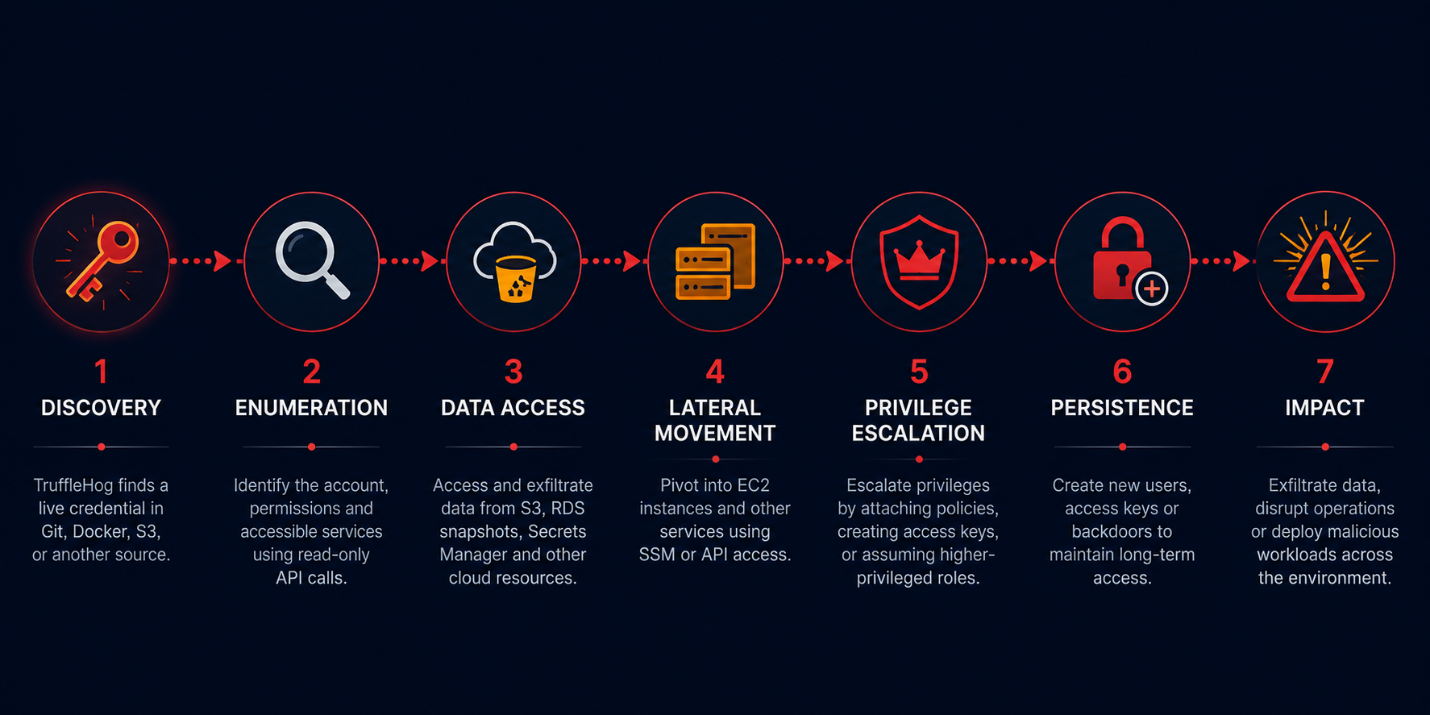
"The most dangerous thing about a leaked cloud key is not the key itself. It is the IAM policy that was provisioned out of convenience six months ago and never reviewed."
- QCT Red Team, Cloud Compromise Post-Mortem Series
GCP and Azure: Same Pattern, Different APIs
TruffleHog's detector coverage extends well beyond AWS. The pivot logic is the same across providers - just different API surfaces.
GCP Service Account Keys
A GCP Service Account key (a JSON file with private_key and client_email) committed to a repo is a long-lived password. TruffleHog detects these by structure, not just regex. Once verified, an attacker calls gcloud auth activate-service-account and moves from there: Cloud Storage enumeration, Cloud Functions injection, or Workload Identity Federation abuse if the SA has broad bindings.
Azure Service Principal Credentials
Azure SPN secrets and connection strings - especially storage account keys and SAS tokens - show up regularly in Terraform configs, ARM templates, and GitHub Actions secrets that were printed to logs at some point. A storage account key gives full read/write access to every container in that account: Blob, Queue, Table, and File. An SPN with Contributor scope is effectively a cloud administrator for that subscription.
Integrating TruffleHog into the SDLC
Running TruffleHog manually beats not running it. Running it automatically as part of your pipeline is the baseline to aim for.
Pre-commit Hook (.pre-commit-config.yaml)
repos:
  - repo: https://github.com/trufflesecurity/trufflehog
    rev: v3.88.0
    hooks:
      - id: trufflehog
        name: TruffleHog Secret Scan
        entry: trufflehog git file://. --only-verified --fail
        language: system
        pass_filenames: false
GitHub Actions Pipeline Step
name: Secrets Scan
on: [push, pull_request]

jobs:
  trufflehog:
    runs-on: ubuntu-latest
    steps:
      - uses: actions/checkout@v4
        with: { fetch-depth: 0 }
      - name: Run TruffleHog
        uses: trufflesecurity/trufflehog@main
        with:
          path: ./
          base: ${{ github.event.repository.default_branch }}
          head: HEAD
          extra_args: --only-verified --fail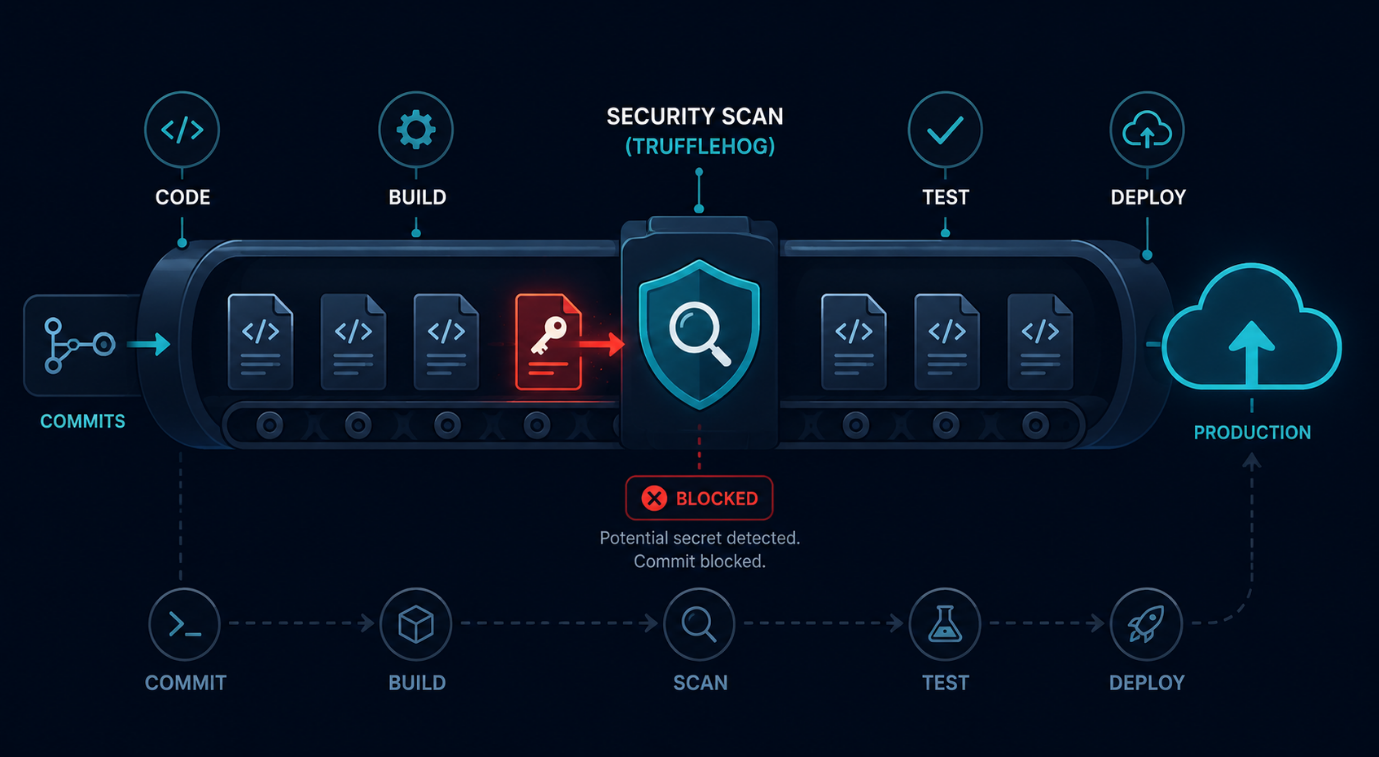
The fetch-depth: 0 matters. Without it, GitHub Actions does a shallow clone and TruffleHog only sees the most recent commit. Secrets buried three months back stay hidden.
Parsing and Triaging TruffleHog Output
At scale - across a large GitHub org or a multi-year repo - TruffleHog output becomes a findings list that needs a triage workflow, not a read-through. JSON output is the right mode for plugging into downstream tooling.
cat findings.json | jq '.[] | select(.Verified == true) | {
  DetectorType: .DetectorType,
  Repository:   .SourceMetadata.Data.Git.repository,
  File:         .SourceMetadata.Data.Git.file,
  Commit:       .SourceMetadata.Data.Git.commit,
  Author:       .SourceMetadata.Data.Git.email
}'
From a blue team perspective, that output feeds two workflows: revoke the key before anything happens with it, and check provider access logs to find out if the exposure window was used.
Detection: What to Look for After a Secret Is Exposed
Rotating the credential closes the window but does not answer the real question: was the key already used? These are the signals to look for across provider logs.
AWS CloudTrail: Filter on the Access Key ID from the exposed credential. Look for GetCallerIdentity (attacker recon), ListBuckets, GetObject on sensitive prefixes, StartSession, and any IAM write calls. Source IPs from hosting providers or Tor exit nodes are strong indicators of external abuse.
GCP Audit Logs: Query protoPayload.authenticationInfo.principalEmail for the service account. High-frequency storage.objects.list from an unusual region, or any iam.serviceAccounts.actAs, warrants immediate investigation.
Azure Activity Log: Filter by the SPN objectId. Look for resource reads across subscriptions it should not have touched, and especially any Microsoft.Authorization/roleAssignments/write calls - that is privilege escalation in Azure.
GitHub Audit Log: If the secret was in GitHub Actions or a repository secret, check secret_scanning.alert_created events and cross-reference with workflow runs that consumed the secret after the exposure commit timestamp.
Common Gaps That TruffleHog Exposes in Practice
Running TruffleHog against an org's repos for the first time rarely comes back clean. These are the gaps we keep seeing:
- Long-lived IAM keys - service accounts created years ago with access keys that have never been rotated, still in active use
- Secrets in deleted files - a .env removed in a later commit, but the key is still live in the repo blob store
- Terraform state in public S3 buckets - state files containing every provider secret used at plan time
- Container image layers - build-time credentials copied into images, deleted in the final layer but present in intermediate ones that are publicly pullable
- CI/CD env vars printed to logs - GitHub Actions steps that echo all env vars during debugging, with logs never marked as sensitive
- Slack and Confluence messages - keys shared in chat "temporarily" that sit in search indexes for years
Remediation Priorities
When a verified secret surfaces, move fast. The order matters:
- Revoke the credential immediately. Disable the AWS access key, invalidate the GCP service account key, reset the Azure SPN secret. Do not rotate first - revoke.
- Review provider access logs for the exposure window. Check what was called, from where, and whether any escalation happened.
- Purge the secret from history using
git filter-repoor BFG Repo Cleaner. Force-push to all branches. Tell all contributors to re-clone. - Issue a replacement credential with least-privilege scope. Do not copy the permissions the original had.
- Add TruffleHog to the pipeline - pre-commit and CI - so the same pattern cannot re-enter.
Note: Removing a secret from Git history does not remove it from GitHub's internal reflog, from forks, or from any system that cached the repo before the purge. Treat every exposed key as compromised. Revocation is the only reliable control. History purge is hygiene, not security.
TruffleHog in a Red Team Workflow
On a red team, TruffleHog cuts the time between initial access and cloud pivot down to almost nothing. A typical workflow looks like this:
- Identify all GitHub orgs tied to the target through OSINT - LinkedIn, job postings, GitHub org discovery
- Run TruffleHog with
--only-verifiedagainst public repos and any repos accessible with the test account's PAT - Enumerate IAM permissions for any verified keys using read-only API calls, staying below GuardDuty's detection threshold
- Map the pivot surface - which services the key can reach, which roles it can assume, which resources it can modify
- Document the full scope before exploiting anything. That is what the client needs in the report.
TruffleHog's verified output maps directly to two MITRE ATT&CK techniques: T1552.001 (Credentials in Files) for discovery and T1078.004 (Valid Accounts: Cloud Accounts) for the access that follows. Both belong in any cloud penetration test report that covers secret exposure.
Key Takeaways
TruffleHog is one of the higher-signal tools available for cloud work - offensive or defensive. It is not a fix. Secrets sprawl is an organisational problem and no tool solves that on its own. But it does force the conversation about where credentials actually live versus where policy says they should.
Orgs that treat TruffleHog output as a block-the-build signal catch exposures before they become incidents. The ones that treat it as a quarterly audit box end up in our IR queue.
In cloud environments, the most common path from external attacker to full account compromise runs through a committed secret. TruffleHog traces that path. Get it into your SDLC.
Connect with QuassrCyberTech Experts
Ready to strengthen your organization's security posture?
At QuassrCyberTech, our specialized cybersecurity solutions help organizations stay ahead of evolving risks. From Vulnerability Assessment and Penetration Testing (VAPT) to Security Operations Center (SOC) implementation, Red Team exercises, and Governance, Risk, and Compliance (GRC) frameworks, we provide the expertise and tools needed to secure your digital assets and infrastructure.
Contact us today to develop a customized security strategy for your organization.
References
- Truffle Security - TruffleHog Documentation
- TruffleHog GitHub Repository
- AWS Security Token Service - GetCallerIdentity
- AWS Systems Manager Session Manager
- Google Cloud - Service Accounts Documentation
- Google Cloud - Audit Logs Overview
- Microsoft Entra ID - Application Objects and Service Principals
- Azure Activity Log Documentation
- OWASP Secrets Management Cheat Sheet
- MITRE ATT&CK - Credentials in Files (T1552.001)
- MITRE ATT&CK - Valid Accounts: Cloud Accounts (T1078.004)
- GitHub - Secret Scanning Documentation