

Introduction
A customer portal, payment page or business API must accept requests from outside the organisation. That access makes the application useful, but it also gives attackers a way to probe for weaknesses. Businesses need a way to inspect those requests while keeping legitimate transactions working.
An open-source Web Application Firewall (WAF) can provide that additional layer of protection. Tools such as ModSecurity and Coraza, combined with suitable security rules, can detect and block many common attack patterns. Their effectiveness depends on where they are deployed, how they are configured and who maintains them.
1. What a WAF Does and Why Business Applications Need One
How request inspection works. A WAF examines web traffic handled by the server or proxy where it is installed. Depending on its configuration, it can inspect the requested address, headers, cookies and request body, including supported form and API data. It compares that information with security rules and records or blocks matching requests according to the active policy.
For example, a product search should contain a search term. An attacker might instead submit text intended to change a database query. A suitable rule can recognise signs of this SQL injection attempt. Other rules look for patterns associated with cross-site scripting, attempts to access restricted files, or commands intended to run on the server.
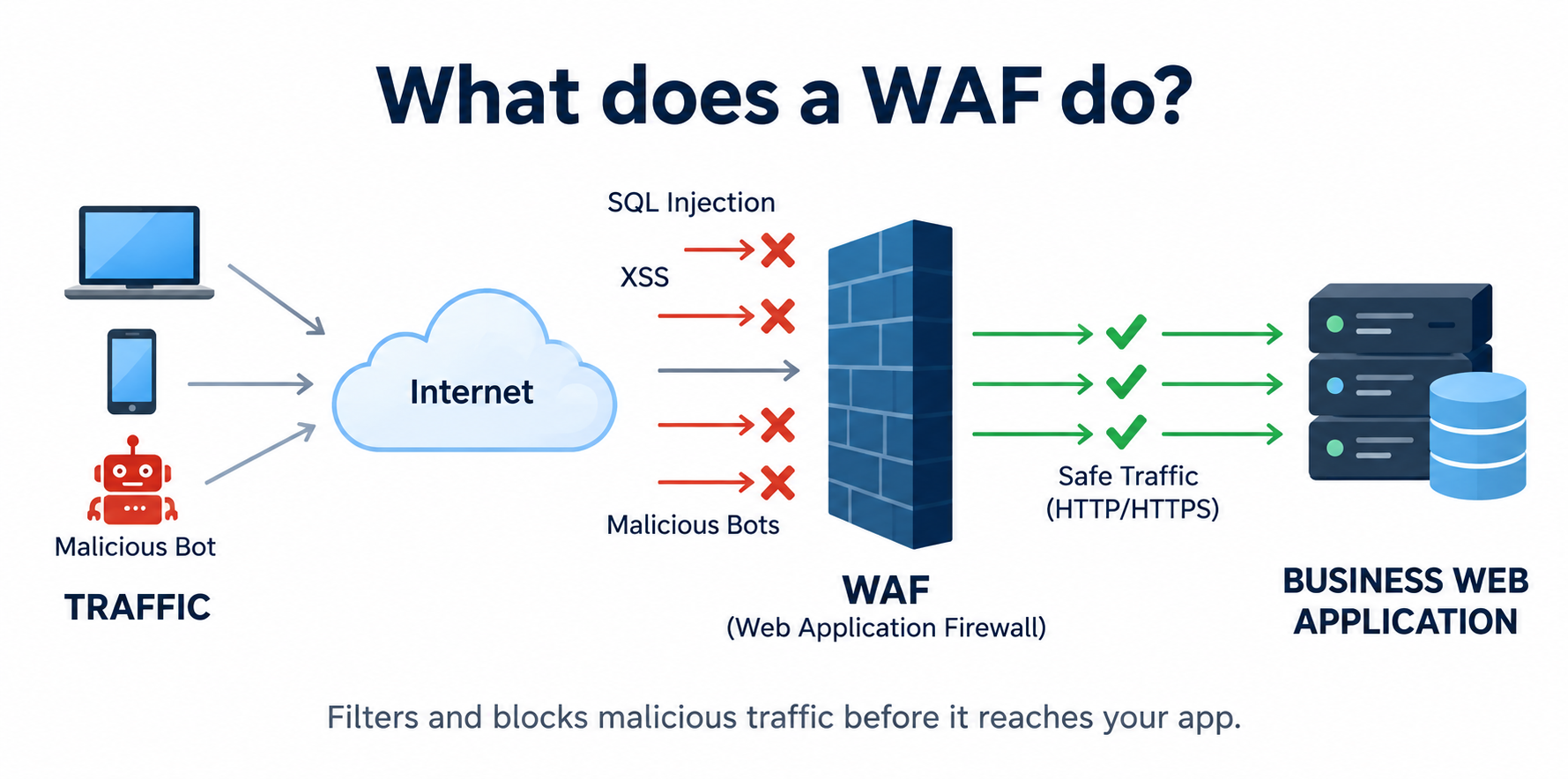
Why this matters to the business. These checks can reduce exposure to common exploitation attempts against customer portals, online stores and APIs. WAF logs also help teams see which application routes are attracting suspicious activity and investigate repeated attempts against sensitive functions.
A WAF can also provide a temporary mitigation while developers fix a known vulnerability. This is often called virtual patching: a rule blocks a recognised exploitation path without changing the application code. The underlying defect still needs to be fixed, and the rule must be tested against relevant attack variations.
A WAF complements network firewalls, secure application development and identity controls. Its particular role is to apply security policy to web requests. It does not automatically inspect every route or every byte of traffic - routing, supported formats and inspection limits determine what it can see.
2. Open-Source Options Such as ModSecurity and Coraza
ModSecurity. ModSecurity is a long-established WAF engine now maintained under OWASP. It inspects web traffic, runs security rules and produces audit events. The engine is integrated with a web server or proxy, so the deployment needs both a suitable engine version and a compatible integration.
For Apache HTTP Server, ModSecurity v2.9.x is the established option. Nginx deployments commonly use ModSecurity v3 with the ModSecurity-nginx connector, which links the engine to Nginx. The latest releases in both the v2.9.x and v3.0.x branches are supported. Choose the branch that fits your server and supports integration.
Coraza. Coraza is an OWASP WAF engine written in Go. It supports the rule language used by ModSecurity and is designed to work with OWASP CRS. Integrations are available for platforms including Caddy, Envoy and Traefik. Each connector has its own requirements and maintenance status, which should be checked before production use.
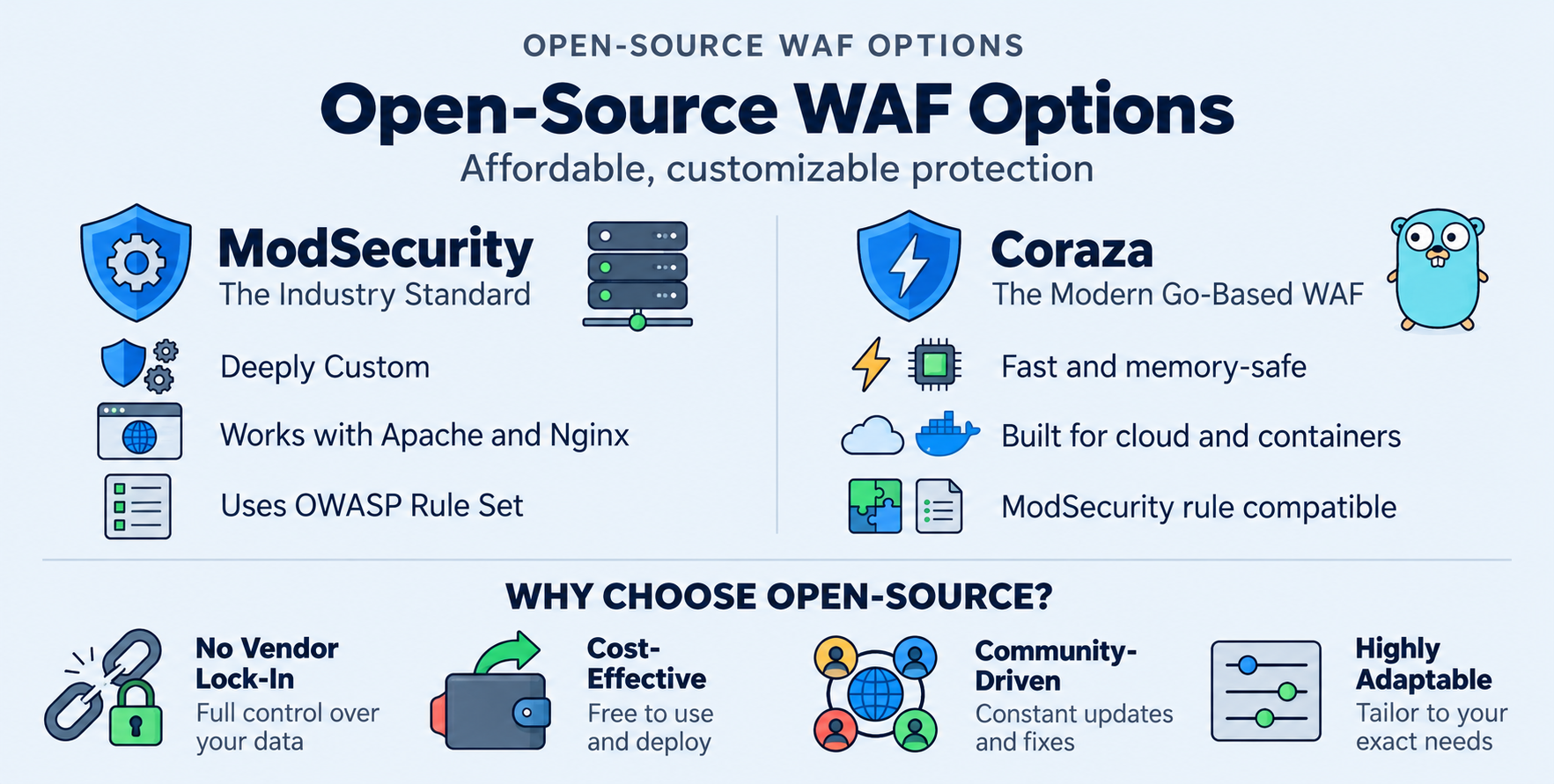
Choosing between them. Start with the web server or gateway already in use, the availability of a maintained connector and the team's operating experience. Then compare performance under realistic traffic, monitoring integration and upgrade procedures. Both engines are open source, but deployment, infrastructure and ongoing support still require a budget.
3. How the OWASP Core Rule Set Fits In
The rules behind the inspection. The OWASP Core Rule Set, commonly called OWASP CRS, is a collection of detection rules. It is not a standalone WAF. ModSecurity or Coraza runs the rules, while a connector or module links that engine to the web server or proxy handling traffic.
CRS provides a starting point for detecting common attack patterns, including SQL injection, cross-site scripting, file inclusion and command injection. It saves teams from writing every rule themselves, although application-specific configuration and testing remain necessary.
How a rule match becomes a decision. CRS commonly uses anomaly scoring. In plain terms, matching rules add points to a request's score. At the blocking evaluation stage, a score that reaches the configured threshold can trigger rejection when the engine is enforcing the policy. In detection-only mode, matches can be logged without the WAF taking those blocking actions.
A rule match is a signal for investigation. It does not prove that an attack succeeded, and a request allowed by the WAF is not guaranteed to be safe. Teams should confirm the recorded action and compare WAF events with application logs when investigating an incident.
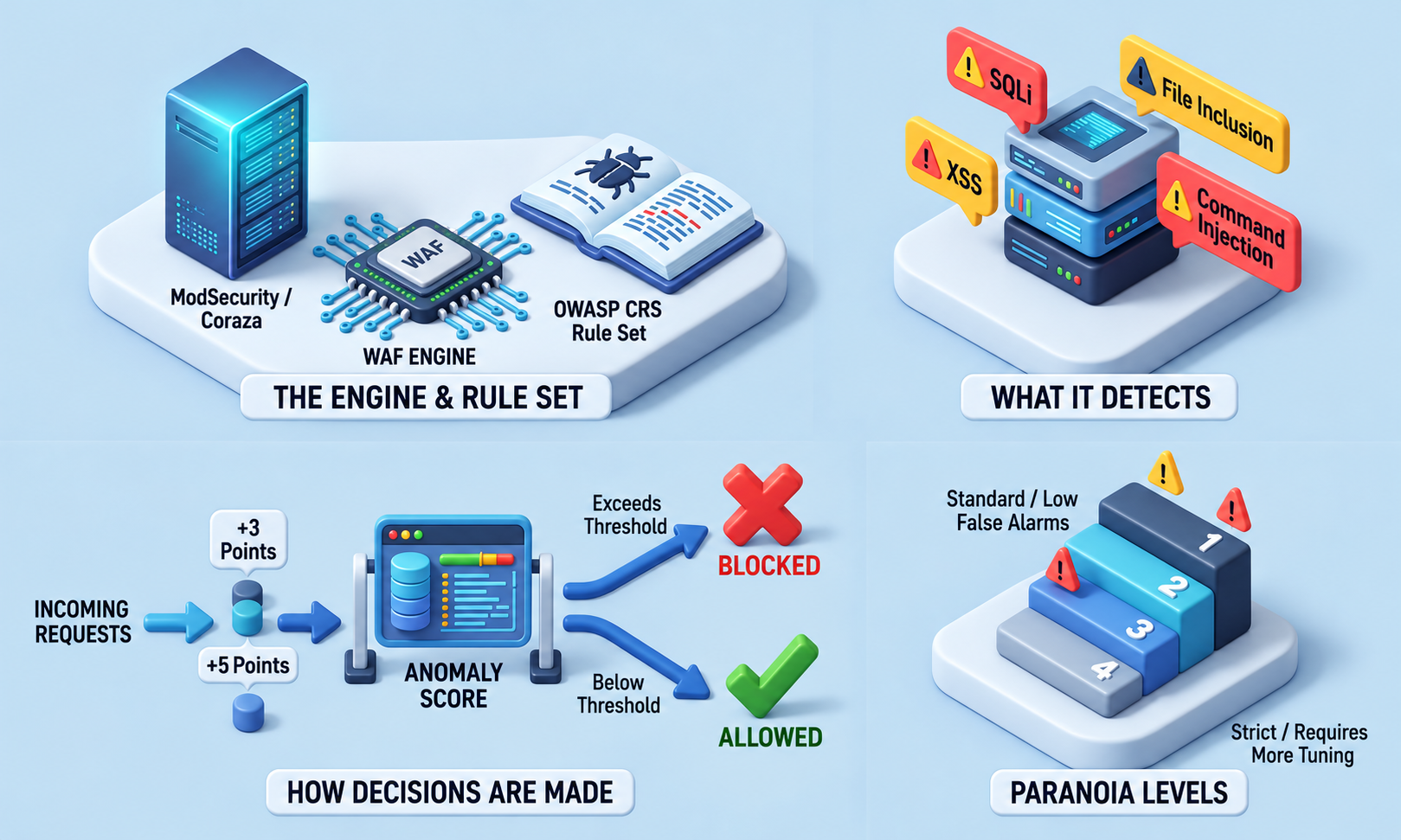
Choosing a suitable rule level. CRS also offers paranoia levels, which control which additional rules are enabled. Higher levels add stricter checks and usually need more tuning to avoid false alarms. This is separate from the score threshold used for blocking. Begin with a configuration the team can validate, then increase coverage as testing and operating experience support it.
4. Where to Deploy the WAF
In front of the application. A common arrangement places the WAF in a reverse proxy: a server that accepts incoming requests and forwards permitted traffic to the application. This can provide one inspection point for several websites or APIs. A load balancer or content delivery network may sit further upstream, depending on the architecture.
Another option integrates the WAF with the application's web server. Container-based platforms may place it at an ingress controller or API gateway, where incoming traffic enters the environment. The right location depends on connector support, traffic paths and how the team manages availability.
Make encrypted traffic inspectable. HTTPS encrypts request contents. The WAF needs access to the decrypted request at the inspection point, usually after HTTPS is terminated at the WAF-enabled proxy or a trusted upstream component. Protect the connection from that point to the application as well, using HTTPS where appropriate.
Prevent routes around the WAF. If the application's origin server remains directly accessible from the internet, requests may bypass the inspection layer. Restrict origin access to approved upstream systems and check that public hostnames and API routes follow the intended path. Accept forwarded client addresses only from trusted proxies so monitoring does not rely on attacker-supplied headers.
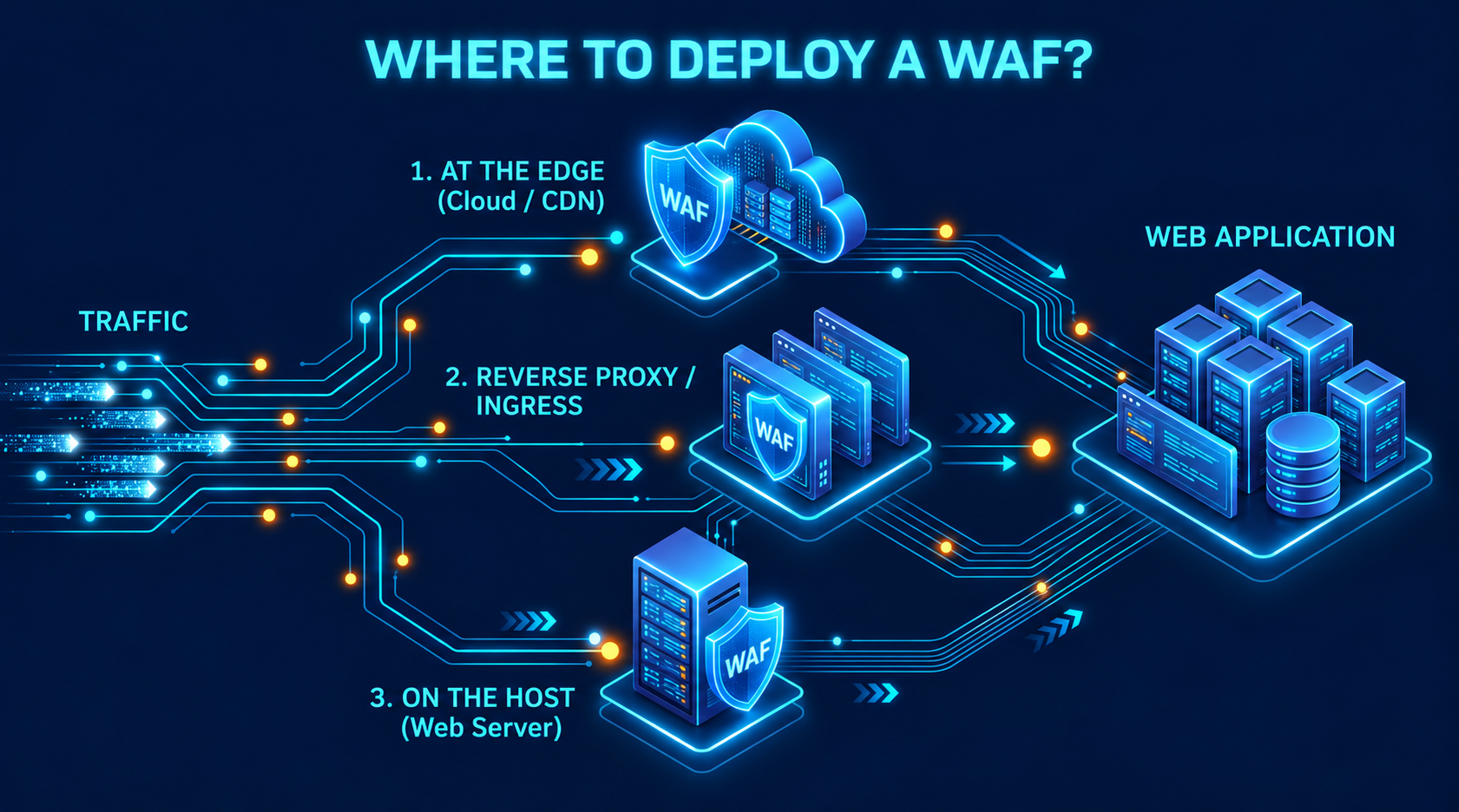
Plan for application traffic and availability. Verify support for the body formats, file uploads and request sizes the application actually uses. Test the behaviour when inspection limits are exceeded. For critical services, provide adequate capacity and redundancy, and decide what should happen if the WAF fails. That decision affects both service availability and exposure to uninspected traffic.
5. How to Test Rules, Monitor Alerts, and Reduce False Positives
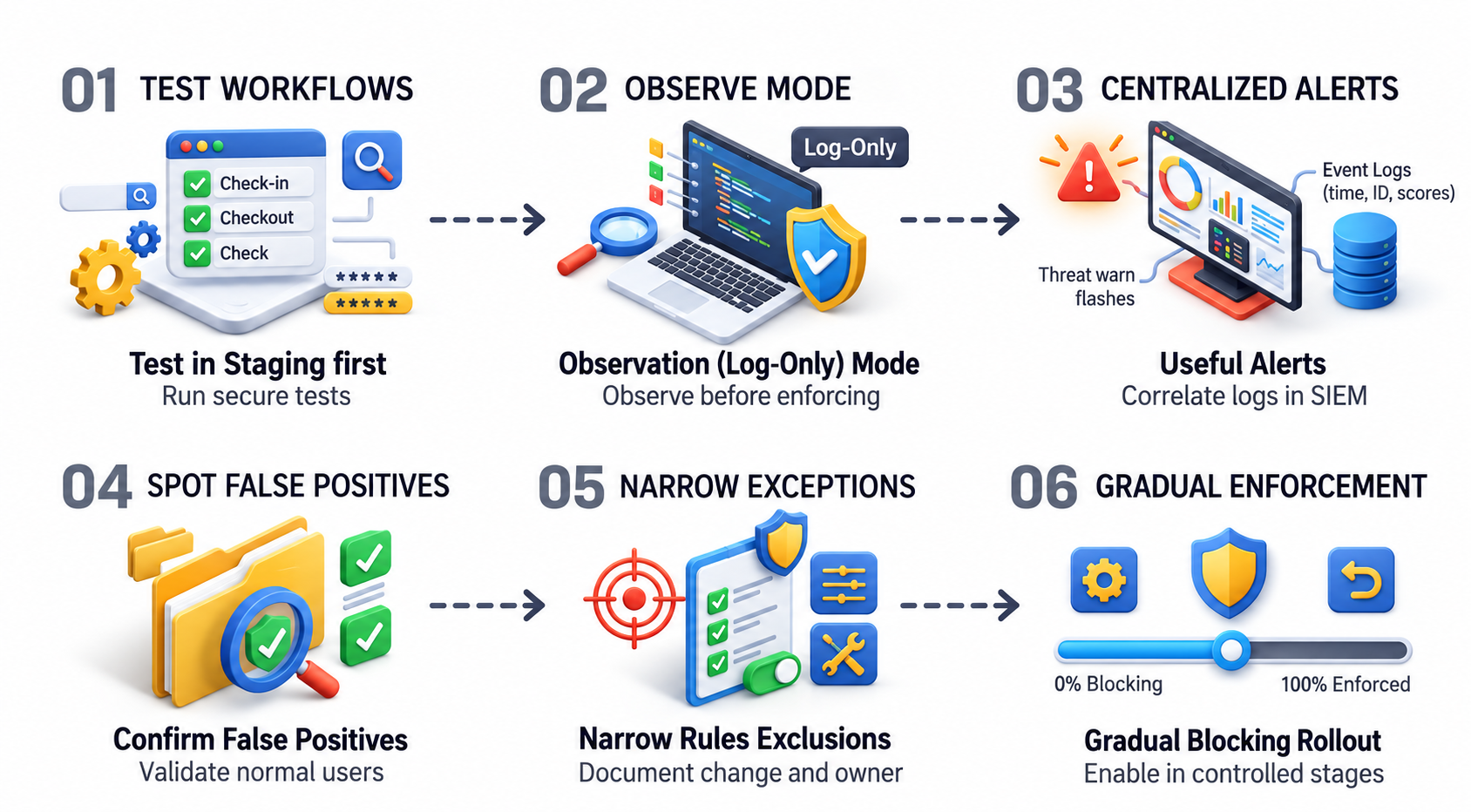
Test normal business activity first. Use a staging environment that resembles production. Exercise sign-in, password reset, checkout, search, file uploads and API calls, including less frequent workflows such as month-end reporting. Add controlled security test cases and confirm both the expected WAF action and the application's response. A successful block test does not establish complete attack coverage.
Observe a new policy before enforcing it. For an initial rollout, detection-only mode provides a way to observe rule matches without applying the WAF's blocking actions. Keep existing protections in place while evaluating the new policy. The observation period should cover representative traffic and business workflows - a fixed number of days does not prove readiness.
Make alerts useful. Collect the time, request identifier, application route, rule ID, action taken and relevant score. Send events to a central monitoring system so the team can correlate them with application and authentication logs. Investigate unusual increases in activity, changes affecting sensitive routes and alerts that coincide with application errors. Also alert when the WAF or its logging stops working.
Recognise false positives. A false positive occurs when legitimate activity triggers an attack rule. For example, a content editor may submit permitted HTML that resembles a cross-site scripting pattern. Confirm the expected application behaviour and reproduce the request before changing the policy. Logging a match and actually blocking a customer are different outcomes.
Make narrow, documented exceptions. Where justified, exclude the specific field from the specific rule on the affected route. Broadly disabling an attack category across the application can remove useful protection elsewhere. Keep local exceptions separate from the supplied CRS rule files, record the reason and owner, and retest both legitimate requests and relevant security cases after the change.
Enable blocking gradually. Move to enforcement when important workflows pass, known false positives are addressed, alerts reach the responsible team and a rollback procedure has been tested. Introduce changes in controlled stages. Track failed transactions, confirmed false positives, response times and server load alongside security alerts, then repeat these checks after application or rule changes.
6. Maintenance, Limitations, and Business Considerations
Maintain the complete deployment. Assign an owner for the engine, connector, web server and rule set. Follow security advisories, test updates promptly and keep a known working configuration available for rollback. Review exclusions after application changes and remove those that are no longer needed. Monitoring should run continuously, with review and response frequency matched to the importance of the service.
Understand the limits. A WAF cannot reliably enforce application-specific business rules or identify every misuse of a valid account. A customer attempting to access another customer's records may send a request that looks technically normal - the application must still check authorisation. Secure coding, timely patching, strong authentication and incident response remain essential.
Do not assume that an open-source WAF engine and CRS provide complete bot management or distributed denial-of-service protection. Rate controls and bot checks depend on the surrounding platform and configuration. Large traffic floods may require upstream protection before they overwhelm the internet connection or the WAF itself.
Protect the information in logs. Requests can contain passwords, session tokens and personal information. Limit what is collected, mask sensitive values where needed, restrict access and define retention periods. Logs should provide enough evidence for investigation without becoming an unnecessary store of sensitive data.
Assess the full business cost. Open-source engines can reduce licence spending and provide flexibility, but staffing, hosting, redundancy, testing and monitoring remain real costs. Compare those costs with available managed services and the organisation's support needs. Evaluate the actual operating model, including who responds when legitimate transactions are blocked outside normal working hours.
Measure useful outcomes. Judge the deployment by coverage of important applications, reliable business transactions, manageable false positives and the team's ability to investigate and recover. Blocked-request totals alone do not demonstrate success. A practical starting point is a scoped pilot with agreed success criteria and an accountable owner for ongoing operation.
Conclusion
An open-source WAF is a practical and cost-effective layer of defence for business-facing applications, but it is not a switch to flip on and leave running. Its value comes from how it is deployed, tuned and maintained over time.
ModSecurity and Coraza, paired with OWASP CRS, give teams a well-supported starting point for detecting and blocking common web attack patterns. Getting from installation to a reliable, production-ready deployment requires understanding where traffic actually flows, what formats the application uses, how legitimate activity looks under inspection rules, and who owns the ongoing operation.
The organisations that get the most from a WAF treat it as part of a broader programme - alongside secure development, timely patching and strong authentication - rather than as a standalone control. A well-configured WAF running in front of a well-built application provides meaningful protection. The same WAF in front of an application with unpatched vulnerabilities and no monitoring is a partial answer at best.
Start with a scoped pilot, agree on success criteria before deployment, build in the testing and observation period the rules require, and assign an owner who will still be accountable six months after go-live. That operating discipline is what turns an open-source tool into a defence that actually holds.
Connect with QuassrCyberTech Experts
Ready to strengthen your organization's security posture?
At QuassrCyberTech, our specialized cybersecurity solutions help organizations stay ahead of evolving risks. From Vulnerability Assessment and Penetration Testing (VAPT) to Security Operations Center (SOC) implementation, Red Team exercises, and Governance, Risk, and Compliance (GRC) frameworks, we provide the expertise and tools needed to secure your digital assets and infrastructure.
Contact us today to develop a customized security strategy for your organization.
References
- OWASP - Web Application Firewall Overview
- OWASP - Virtual Patching Cheat Sheet
- ModSecurity - Security Advisories
- ModSecurity - Version and Support FAQ
- Coraza - Introduction and Compatibility